
Notifications
Choose how Precog tells you when your connections succeed, fail, or recover.
Precog can notify you about the health of your connections by email and in the app. Notification settings are per person, not per workspace — your choices follow you across every workspace and organization you belong to, and each member of a workspace chooses their own.
To change them, open Account → Notifications.
Notification types
Each type has independent In-App and Email switches, so you can (for example) see successes in the app while only emailing yourself about failures.
| Type | When it is sent |
|---|---|
| Run Success | Every time a connection run completes successfully |
| Run Failure | As soon as a connection starts failing, then once a day until it recovers |
| Connection Status Changes | When a failing connection recovers |
All notifications are off by default. Nothing is sent until you turn it on.
How failure notifications work
A connection that is broken usually stays broken until someone fixes it. If it runs every fifteen minutes, it fails every fifteen minutes — and notifying you each time would bury the one message that mattered.
Precog handles this in two stages:
The first failure is sent immediately. When a connection that was healthy starts failing, you are told straight away, with the error message and a link to the run.
Repeat failures are summarised once a day. While the connection keeps failing, further failures are collected and delivered as a single daily summary — "may4_demo is still failing" — telling you how many runs failed since you were last notified and when the failures started. If several connections are failing, they arrive in one message rather than one per connection.
The cycle resets when the connection recovers. The next time it succeeds, the streak ends. If it fails again later, that failure is treated as a new first failure and is sent immediately.
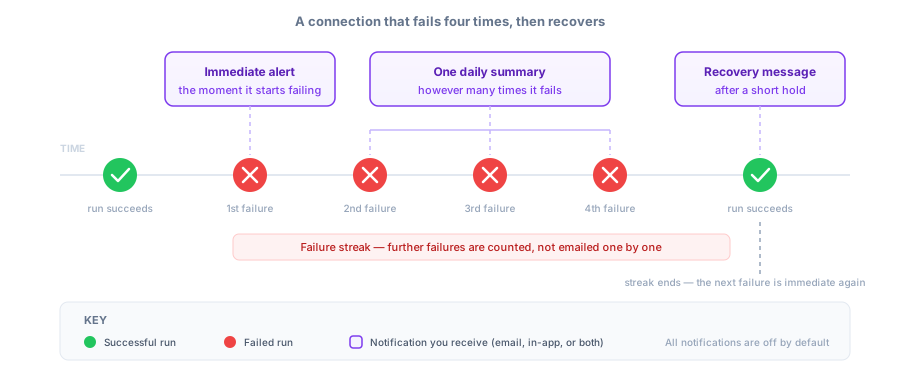
This means you can leave failure notifications switched on without being flooded, and the immediacy is reserved for genuinely new problems.
Note that the daily summary is only sent while a connection is still failing. A connection that fails once and recovers produces a single immediate notification and no summary.
How recovery notifications work
When a failing connection succeeds again, Connection Status Changes sends a recovery message.
Recovery notifications are held briefly before sending. A connection that fails, recovers and immediately fails again has not really recovered, and the short delay means you are not told that it has. If the connection fails again during that window, the recovery message is discarded rather than sent.
You will not receive a status-change notification when a connection starts failing — that is already covered by Run Failure.
Where notifications appear
In-app notifications appear in the notifications panel inside Precog, where you can mark them as read or dismiss them. Failure notifications are marked high priority.
Email notifications go to the address on your Precog account and include a link back to the relevant run or connection.
Notifying other systems
Notification settings cover people. To tell another system when a connection runs — to refresh a dashboard, open a ticket, or trigger a downstream job — use Webhooks, which deliver an event for every run start, success, and failure with no aggregation or delay.